A full motorized standing desk is nice, but it is not always the smartest first purchase. Renters, apartment workers, and people with a perfectly good existing desk often need a cheaper way to alternate between sitting and standing without rebuilding the entire room.
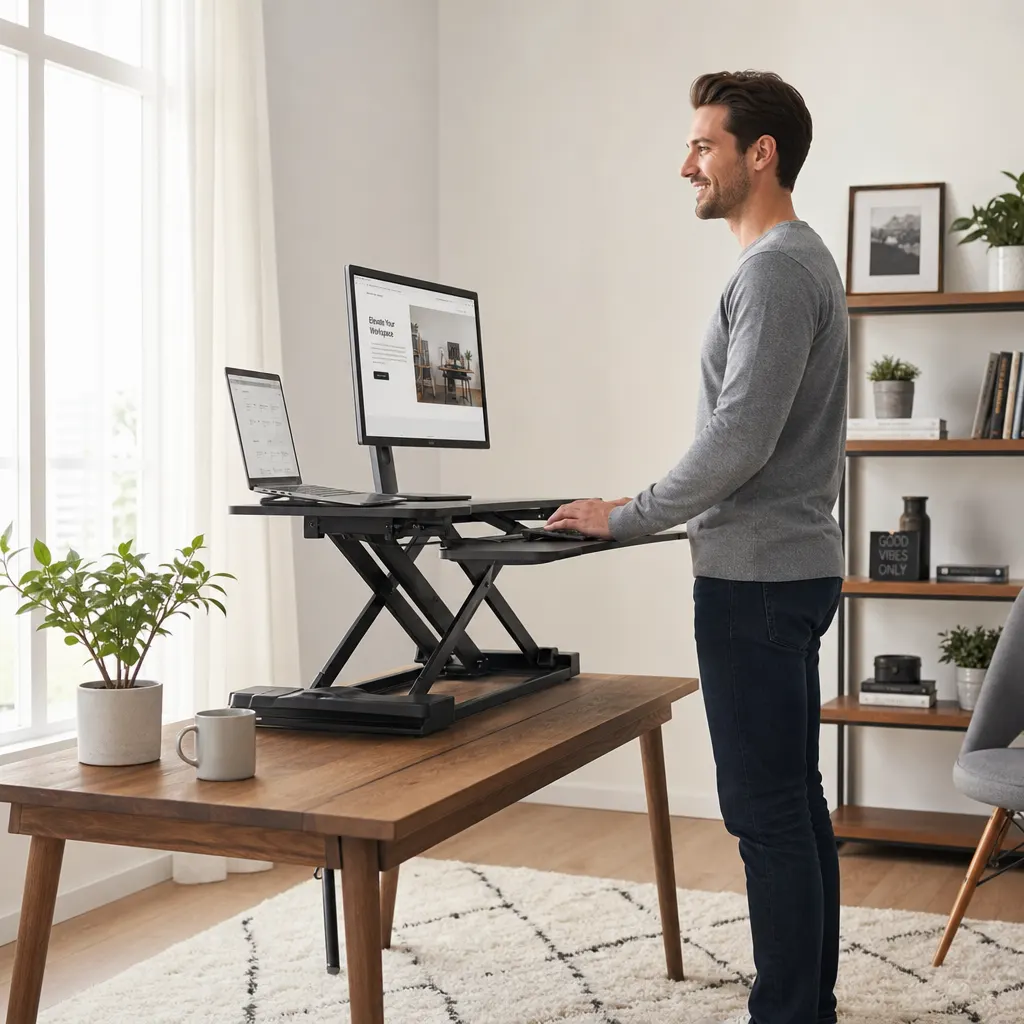
That is where a standing desk converter earns its place. It sits on your current desk, raises your monitor and keyboard together, and lets you test a sit-stand routine before committing to new furniture. If you are building the whole ergonomic setup in stages, compare this purchase against the best ergonomic products for remote workers on tight budgets before spending the full budget on the converter alone.
Why a Standing Desk Converter is a Remote Work Game-Changer
The science is clear: breaking up long periods of sitting is crucial for your health. Studies from institutions like the National Institutes of Health link prolonged sedentary time to a host of issues, including back pain and metabolic problems. By simply alternating between sitting and standing, you can:
- Boost Energy and Focus: Standing naturally increases blood flow, which can help fight off that dreaded afternoon slump and keep you sharp during long calls.
- Improve Posture: Standing encourages you to engage your core and align your spine, reducing the slouching that’s so common in a desk chair.
- Save Space and Money: A converter gives you much of the practical benefit of a full standing desk at a lower cost and without sacrificing your current desk.
Key Features to Look for in 2026 Models
The market is full of options, but the best converters share a few key features:
- Lift Mechanism: Most converters use a gas spring with a lever, which is smooth and reliable. For a more premium experience, electric models offer push-button height adjustment, which is great for finding that perfect micro-adjustment.
- Stability: A wobbly keyboard tray is a deal-breaker. Look for models with a sturdy X-frame or a solid central column design to ensure it’s stable enough for vigorous typing.
- Surface Area: Make sure the top surface is large enough for your monitor(s) and any other essentials. A dual-level design with a separate keyboard and mouse tray is essential for proper ergonomics.
- Weight Capacity: Check that the converter can handle the combined weight of your monitors, laptop, and anything else you keep on your desk. Most quality models can hold at least 15kg (33 lbs).
Standing Desk Converter Comparison
| Converter style | Best for | Watch out for | Budget priority |
|---|---|---|---|
| Gas-spring desktop riser | Most remote workers, dual monitors, and standard desks | Cheap models can wobble at full height | Best first choice if you want value and stability |
| Electric desktop converter | Workers who switch height often or share a desk | Higher price and more cable clutter | Worth it if manual lifting keeps you from standing |
| Compact straight-up riser | Small desks, apartment setups, and single-monitor stations | Less room for notebooks, speakers, or large keyboards | Good choice when desk depth is the constraint |
| Full standing desk | Permanent home offices with room for new furniture | More expensive and harder to move | Better after you know sit-stand work fits your routine |
Our Top 3 Standing Desk Converter Picks for 2026
After comparing features, user reviews, and value, here are our top picks for transforming your workspace.
Disclosure: This guide includes Amazon affiliate links. If you buy through those links, we may earn a commission at no extra cost to you.
1. Best Overall: FLEXISPOT M2B
For most people, the FLEXISPOT M2B Standing Desk Converter is the undisputed champion. It uses a reliable gas-spring lift, offers a spacious 35-inch work surface, and features a deep, ergonomic keyboard tray. It’s incredibly stable, easy to operate, and provides enough room for a dual-monitor setup. It hits the perfect balance of quality, functionality, and price.
2. Best Electric Option: VIVO Electric Motor Riser
If you love seamless, push-button adjustments, the VIVO Electric Motor Stand Up Desk Converter is worth the upgrade. Its powerful motor ensures a smooth and effortless lift, making you more likely to switch positions throughout the day. It also includes an integrated device slot for your phone or tablet.
3. Best for Small Desks: VariDesk Essential 30
When desk space is at a premium, you need a converter with a smaller footprint. The VariDesk Essential 30 is designed for compact spaces. It rises straight up and down, minimizing its depth, and still offers a sturdy, dual-level design that’s perfect for a laptop and a single monitor.
Getting the Most Out of Your New Setup
To truly complete your ergonomic transformation, consider adding an anti-fatigue mat. Standing on a cushioned surface makes a real difference, allowing you to stand comfortably for longer periods. Also, ensure your monitor is at eye level in both sitting and standing positions to avoid neck strain.
Do not ignore the keyboard tray. A converter that lifts your monitor but leaves your hands reaching forward can trade back relief for shoulder and wrist strain. Pair the converter with the right keyboard shape using our ergonomic keyboard guide for remote workers, especially if you type long documents, code, or live in spreadsheets.
If the converter raises your keyboard tray but your feet feel unsupported while sitting, fix that before adding more standing time. A work from home foot rest can help when your chair has to stay high enough for comfortable typing. Laptop-first workers should also check whether a laptop stand for remote work is enough before buying a larger converter.
For the cheapest complete path, use the tight-budget ergonomic products guide to decide whether your money should go toward a converter, chair, foot rest, laptop stand, or keyboard first.
FAQ: Standing Desk Converters
How long should I stand each day?
The goal isn't to stand all day. The magic is in the alternation. Start with 15-20 minutes of standing every hour and see how it feels. A good rhythm is to sit for focused work and stand for meetings, calls, or administrative tasks.
Will a converter damage my existing desk?
No. Quality converters have non-slip rubber pads on the bottom to protect your desk surface. However, it's always a good idea to check the weight capacity of your desk itself to ensure it can handle the converter plus all your gear.
Is a converter as good as a full standing desk?
It's a trade-off. A full standing desk offers a larger, single-level work surface. However, a converter is far more affordable, easier to set up, and a better fit for renters or those who love their current desk. For most remote workers, a converter is the more practical and effective choice.
The Bottom Line
A standing desk converter is one of the single best investments you can make in your remote work life. It's a simple, powerful tool for improving your health, boosting your focus, and making your home office a more comfortable and productive space. By choosing a stable, ergonomic model like the ones listed here, you're not just buying a piece of equipment—you're upgrading your entire workday.
Start with stability, height range, and keyboard position rather than the biggest top deck you can find. Then connect the converter to the rest of your desk setup: chair height, foot support, screen height, and the right ergonomic keyboard for the way you work.